




























Punjab Matric Result 2026 Announced: Check Your Marks Online, by SMS and Gazette
Punjab Matric Result 2026 is live. Check 10th class marks by roll number, name, SMS or official board website.

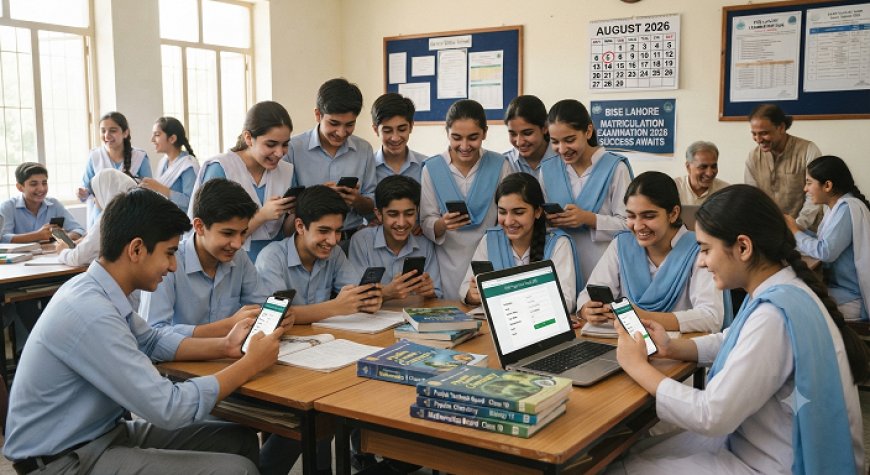
Punjab Matric Result 2026 Is Live
The Punjab Matric Result 2026 for 10th class / SSC Part II was announced simultaneously by all nine Punjab education boards on Thursday, August 6, 2026, at 10:00 a.m.academiamag+1
Students can check their result by entering their roll number on the official board website. Some boards also provide result access through SMS, while the official gazette may be available through the respective board after the online result release.
The result matters for students applying to FSc Pre-Medical, FSc Pre-Engineering, ICS, FA, ICom and other intermediate programmes. Students should save their online result and contact their school or board if any marks or personal details appear incorrect.
Which Punjab boards announced the result?
The result was released for students affiliated with these nine boards:
All nine Punjab boards released the SSC Part II result on the same announced date.academiamag+1
How to check Punjab Matric Result online
-
Open the official website of your BISE board.
-
Select the Matric, SSC Part II or 10th Class Result 2026 option.
-
Enter your roll number.
-
Submit the form.
-
Check your subject-wise marks, total marks, grade and result status.
-
Download or screenshot the online result for your records.
BISE Lahore’s official website currently displays the SSC First Annual Examination 2026 result search option.biselahore
Official board websites
If a board website becomes slow, do not repeatedly refresh the page. Use the SMS method or try again after a few minutes.
How to check the result by SMS
Open your phone’s messaging application, type your roll number only and send it to the SMS code for your board.
The SMS codes above are widely reported for Punjab Board result checking, but students should verify the code on their board’s official website if a message does not return a result.dailypakistan+1
SMS example
If your roll number is 123456, type:
123456
Send it to the SMS code assigned to your board. Do not add your name, board name or other text unless the board specifically asks for it.
Can students check the result by name?
Name-based result checking may be available through some third-party result pages or gazette files, but the official board portal usually relies on the roll number.
If you have lost your roll number slip:
-
Contact your school.
-
Ask the relevant BISE office for assistance.
-
Check the official gazette when it becomes available.
-
Avoid entering personal information on unknown result websites.
The roll number remains the most direct and reliable method for checking an individual result online.
What details appear on the result?
The online result may show:
-
Student name.
-
Roll number.
-
Examination group.
-
Subject-wise marks.
-
Total marks.
-
Grade.
-
Pass or fail status.
-
Practical marks, where applicable.
-
Result remarks, if issued by the board.
The online page is normally used as a provisional result record. Students should collect the official result card or detailed marks certificate from their school or board when it is issued.
What should students do after checking their marks?
Save a copy of the result
Download, screenshot or print the result page. Keep a copy for college applications, scholarship forms and personal records.
Check every subject
Compare the marks shown online with your expectations and any available school record. Check your name, father’s name, roll number, group and subject details.
Start intermediate admission planning
Students should now shortlist colleges and programmes according to their marks, subject interests and career plans.
Common options include:
-
FSc Pre-Medical.
-
FSc Pre-Engineering.
-
ICS.
-
FA.
-
ICom.
-
Technical and vocational programmes.
-
A-Level or other recognised intermediate-equivalent pathways.
Admission dates and merit requirements vary by college. Students should check each college’s official notice instead of assuming that one deadline applies across Punjab.
Ask about rechecking if needed
If your marks appear lower than expected, check your board’s official rules for rechecking, recounting or result-related applications. The procedure, fee and deadline must be confirmed from the relevant BISE board.
Keep documents ready
Students may need:
-
Online result copy.
-
Original or provisional result card.
-
B-Form or CNIC.
-
Father’s or guardian’s CNIC copy.
-
Passport-size photographs.
-
School leaving certificate.
-
Domicile, where required.
-
Character certificate.
-
Admission application and fee documents.
Do not submit original documents to a college without confirming the institution’s procedure.
What if the website is not opening?
High traffic can slow result portals after the announcement. Try these steps:
-
Confirm that you are using the correct official board website.
-
Recheck the roll number.
-
Remove extra spaces when entering the number.
-
Use a different browser or mobile network.
-
Try the SMS method.
-
Wait a few minutes before trying again.
-
Save the result after the page loads.
Do not share your full roll number, CNIC or personal details in public social media comments.
What if marks or personal details are wrong?
Take a screenshot of the displayed result and contact the relevant BISE office or your school. Ask about the official process for correction, rechecking or correction of personal information.
Do not rely on an unofficial Facebook post or academy representative for a correction request. The relevant board will provide the valid procedure, fee and deadline.
Does this result include 9th class?
No. This announcement concerns the 10th class / SSC Part II / Matric annual result 2026. The 9th class result is a separate examination result and should not be confused with the SSC Part II announcement.ilmiworld
Myth vs Fact
E-E-A-T note
This article is based on the Punjab boards’ announced SSC Part II result schedule, the IlmiWorld result update and official board result pages, including the live BISE Lahore result search page.ilmiworld+1
IlmiWorld should update this page if a board changes its result portal, publishes a new gazette, announces a rechecking deadline or issues a correction notice.
FAQs
When was the Punjab Matric Result 2026 announced?
The Punjab Matric Result 2026 was announced on August 6, 2026, at 10:00 a.m. for SSC Part II students across all nine Punjab boards.academiamag+1
How can I check my Punjab Board 10th class result?
Visit your board’s official website, select the SSC Part II or 10th class result option, enter your roll number and submit the form.
How can I check BISE Faisalabad Matric Result 2026?
Open the BISE Faisalabad official website and use the result section. Faisalabad students can also try the SMS method by sending their roll number to 800240.dailypakistan+1
What is the SMS code for BISE Lahore Matric Result 2026?
The commonly reported BISE Lahore SMS code is 800291. Send your roll number only and verify the code through the official Lahore board website if the service does not respond.dailypakistan
Can I check the Punjab Matric Result by roll number?
Yes. Roll-number checking is the standard method available through the official BISE result portals.
Can I check the result by name?
Name-based checking may be available through some result services or gazette files, but the official board website generally provides the most direct roll-number search.
What should I do after checking my marks?
Save a copy of the result, check all subject details and begin applying for suitable intermediate programmes such as FSc, ICS, FA or ICom.
What if I fail one or more subjects?
Check the relevant BISE board’s official notice for supplementary or second annual examination registration, fee and schedule. Do not rely on an unverified deadline.
Can I apply for result rechecking?
Most boards publish a formal procedure for rechecking or recounting. Check your own BISE website for the application method, fee and last date.
Is the online result enough for college admission?
A college may accept the online result temporarily, but it can later require the official result card, detailed marks certificate or other documents. Confirm the requirement with the college before submitting your application.
Conclusion
Punjab Matric Result 2026 is available for students of all nine Punjab boards. Check your marks through the official board portal or SMS, save the result copy and start intermediate admission planning without waiting for unofficial updates.
What's Your Reaction?
 Like
0
Like
0
 Dislike
0
Dislike
0
 Love
0
Love
0
 Funny
0
Funny
0
 Angry
0
Angry
0
 Sad
0
Sad
0
 Wow
0
Wow
0